
導入
This manual provides instructions for the setup, operation, and maintenance of your Logitech Wingman Force Joystick, model 963155-0403. This device is designed to enhance your PC gaming experience with force feedback technology and programmable controls.
パッケージ内容
パッケージに次のアイテムが含まれていることを確認してください。
- Logitech Wingman Force Joystick
- 電源アダプター
- USBケーブル(一体型または別売)
- Software CD (if applicable, for WingMan Software)
- ユーザーマニュアル(このドキュメント)
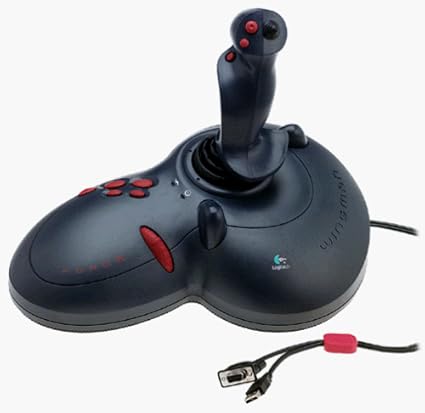
Figure 1: The Logitech Wingman Force Joystick packaging, showing the joystick and its features.
設定
- 接続電源: Plug the power adapter into the joystick and then into a standard electrical outlet.
- PCに接続: Connect the joystick's USB cable to an available USB port on your computer. The joystick also supports serial interfaces.
- ソフトウェアをインストールする: Insert the WingMan Software CD (if provided) into your computer's CD-ROM drive and follow the on-screen instructions to install the drivers and WingMan Software. If no CD is provided, drivers may be automatically installed by your operating system or available for download from the Logitech support webサイト。
- システム要件: Ensure your computer runs a compatible Windows operating system.
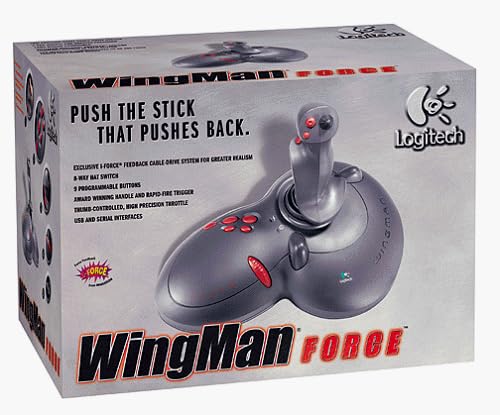
Figure 2: The Logitech Wingman Force Joystick, illustrating its ergonomic design and button layout.
操作手順
コントロールオーバーview
- Joystick Handle: Provides precise control for in-game movement.
- 9 つのプログラム可能なボタン: Customize these buttons using the WingMan Software for various in-game actions.
- 8ウェイハットスイッチ: Located on top of the joystick, this switch allows for quick camera views or directional commands.
- Thumb-Controlled Throttle: Adjust speed or thrust with the integrated throttle control.
フォースフィードバック技術
The Wingman Force Joystick utilizes Logitech's exclusive I-Force force feedback technology with a cable-drive system. This system provides realistic tactile feedback, such as vibrations from impacts, recoil from weapons, and resistance during maneuvers, enhancing immersion in compatible games.
Using WingMan Software
The WingMan Software allows you to:
- Program the 9 buttons for specific game functions.
- 複数のプロを作成して保存fileさまざまなゲームに対応します。
- Adjust force feedback intensity settings.
- Calibrate the joystick for optimal performance.
Refer to the WingMan Software's help documentation for detailed instructions on customization and profile 管理。
メンテナンス
To ensure the longevity and optimal performance of your joystick:
- クリーニング: Use a soft, dry cloth to wipe the surface of the joystick. Avoid using abrasive cleaners or solvents.
- ストレージ: Store the joystick in a clean, dry environment away from extreme temperatures and direct sunlight.
- ケーブルのお手入れ: ケーブルを過度に曲げたり、圧着したりしないでください。
トラブルシューティング
- Problem: Joystick not recognized by computer.
- 解決:
- USB ケーブルがジョイスティックとコンピュータの両方にしっかりと接続されていることを確認します。
- 別のUSBポートに接続してみてください。
- Verify that the power adapter is properly connected and the joystick is receiving power.
- Reinstall the WingMan Software drivers.
- Problem: Inconsistent or absent force feedback.
- 解決:
- Check the force feedback settings within the WingMan Software and ensure they are set to an appropriate level.
- プレイしているゲームがフォース フィードバックをサポートしており、ゲームの設定で有効になっていることを確認します。
- Restart your computer and the game.
- すべての接続が安全であることを確認します。
- Problem: Buttons or controls are unresponsive.
- 解決:
- Calibrate the joystick using the WingMan Software.
- Ensure the joystick drivers are up to date.
- Test the joystick in a different game or application to determine if the issue is game-specific.
仕様
| 特徴 | 詳細 |
|---|---|
| モデル番号 | 963155-0403 |
| ブランド | ロジテック |
| コントローラータイプ | ジョイスティック |
| 接続技術 | USB、シリアル |
| 対応デバイス | Windows PCの場合 |
| 製品寸法 | 13.5 x 9.63 x 9.25インチ |
| アイテム重量 | 4.14ポンド |
| フォースフィードバック | I-Force feedback cable-drive system |
| ボタン | 9つのプログラム可能なボタン |
| ハットスイッチ | 8ウェイハットスイッチ |
| スロットル | Thumb-controlled, high precision throttle |
保証とサポート
For warranty information and technical support, please refer to the documentation included with your product or visit the official Logitech support webサイト。通常、ドライバー、FAQ、カスタマーサービスの連絡先情報がそこに掲載されています。
Logitechサポート Webサイト: www.logitech.com/support